Alipay
Alipay
Payment process
The payment interface adopts server-side integration, namely Server To Server mode. The specific process is as follows:
- The user places an order on the mini program/APP/browser website
- The online store submits the order information to this interface
- FireAnt submit the order to the Alipay server, and then return the result of creating the order and redirect url to the online store
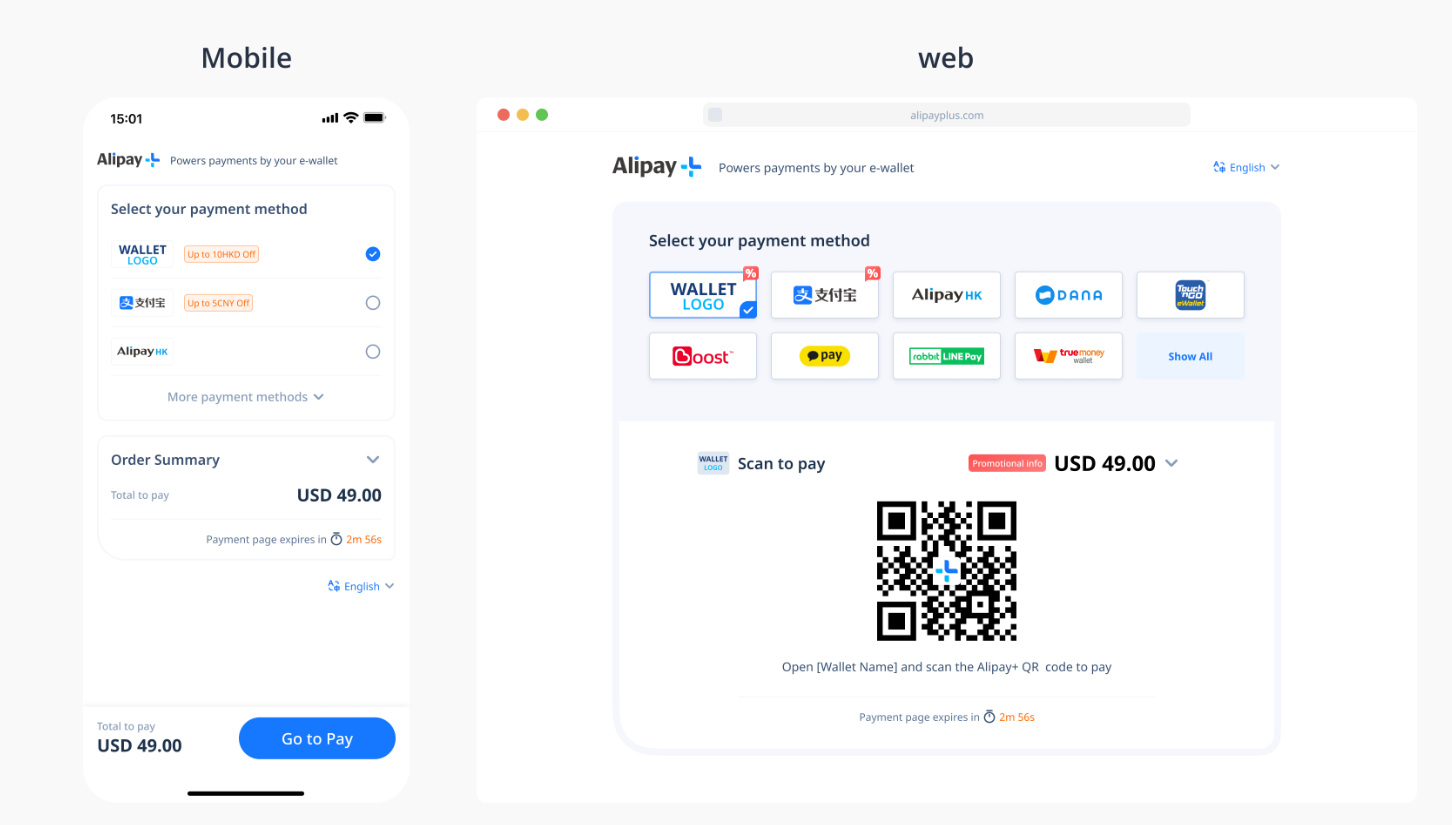
- The online store redirects to the Alipay payment link and calls up Alipay payment (different payment methods are called up in different scenarios, such as displaying payment QR codes in PC browser and calls up Alipay applications in mobile browser)
- After the user completes the payment, FireAnt will notify the online store of the result through notifyUrl
Among them, steps 2-3 involve the server submitting data and do not involve the browser. There may be some differences in the specific programming language used, Payment Submission Example。
Form parameter format description
| Name | Type | Max Length | Required | Description |
|---|---|---|---|---|
| Order information | ||||
| merNo | String | 5 | Yes | Merchant ID number Explanation: PSP assigns a unique identifier to merchants |
| gatewayNo | String | 8 | Yes | Merchant gateway number Explanation: PSP assigns a unique identifier to sub merchants |
| orderNo | String | 50 | Yes | Merchant Order Number Rule: Merchant order number. Unique identifier, do not duplicate order numbers in the same online store system |
| orderCurrency | String | 3 | Yes | Order currency Explanation: 3-digit ISO 4217 code, currency code can be found in the appendix. |
| orderAmount | String | 10 | Yes | Order amount Rule: No more than two decimal places |
| shipFee | String | 100 | No | Shipping fee Rule: No more than two decimal places |
| discount | String | 100 | No | discount Discounts default to negative values It can only be a number and is limited to 2 decimal places |
| goodsInfo | String | 5000 | Yes | Detailed information of goods Including the name, ID, unit price, and quantity of the goods Please refer to Appendix: Goods Information |
| Local payment information | ||||
| paymentMethod | String | 50 | Yes | Payment method, fixed Alipay |
| tradeType | String | 50 | Yes | Transaction type WEB: PC website payment WAP: Mobile website payment APP: App payment MINI_APP: Mini program payment |
| limitPay | String | 50 | No | Specify payment method only MINI-APP requires specification, such as TRUEMONEY, ALIPAY_HK, TNG, ALIPAY_CN, GCASH, DANA, TOSS |
| ip | String | 50 | No | User IP |
| os | String | 50 | No | Operating System: IOS or ANDROID, provided under WAP or APP |
| Shipping information | ||||
| shipFirstName | String | 100 | No | Consignee's first name |
| shipLastName | String | 100 | No | Consignee's last name |
| shipEmail | String | 100 | No | Consignee's email |
| shipPhone | String | 100 | No | Consignee's phone |
| shipCountry | String | 100 | No | Consignee's country ISO 3166-1 country code, such as US. |
| shipState | String | 100 | No | Consignee's state |
| shipCity | String | 100 | No | Consignee's city |
| shipAddress | String | 100 | No | Consignee's address |
| shipZip | String | 100 | No | Consignee's zip |
| Other information | ||||
| notifyUrl | String | 200 | Yes | Asynchronous notification url. After the payment is completed, the platform will notify this address of the payment result through server-side POST. The asynchronous address will return OK upon receiving the request, otherwise it will return up to 3 times within a period of time |
| signInfo | String | 32 | Yes | Encrypt signature information Combine the payment submission parameters and then perform sha256 encryption. The specific parameter combination order is as follows, and the order cannot be changed:merNo + gatewayNo +orderNo + orderCurrency +orderAmount + notifyUrl + merKey(secret key, can be queried in the merchant's backend),the order of these parameters cannot be modified, and there should be no spaces or + in between Please refer to Appendix: SHA256 Encryption |
| remark | String | 500 | No | Order remark information. |
Payment Submission Example
OkHttpClient client = new OkHttpClient().newBuilder()
.build();
MediaType mediaType = MediaType.parse("application/x-www-form-urlencoded");
RequestBody body = RequestBody.create(mediaType, "merNo=30000&gatewayNo=30000001&orderNo=12345678&orderCurrency=USD&orderAmount=100.00&goodsInfo=Good1-Name#,#123#,#50.00#,#2&paymentMethod=Alipay&tradeType=WAP&os=ANDROID&ip=127.0.0.1¬ifyUrl=https://xxx.com/notifyurl&signInfo=61be55a8e2f6b4e172338b...");
Request request = new Request.Builder()
.url("https://sandbox.fireantspay.com/AlipayInterface")
.method("POST", body)
.addHeader("Content-Type", "application/x-www-form-urlencoded")
.build();
Response response = client.newCall(request).execute();$curl = curl_init();
curl_setopt_array($curl, array(
CURLOPT_URL => 'https://sandbox.fireantspay.com/AlipayInterface',
CURLOPT_RETURNTRANSFER => true,
CURLOPT_ENCODING => '',
CURLOPT_MAXREDIRS => 10,
CURLOPT_TIMEOUT => 0,
CURLOPT_FOLLOWLOCATION => true,
CURLOPT_HTTP_VERSION => CURL_HTTP_VERSION_1_1,
CURLOPT_CUSTOMREQUEST => 'POST',
CURLOPT_POSTFIELDS => 'merNo=30000&gatewayNo=30000001&orderNo=12345678&orderCurrency=USD&orderAmount=100.00&goodsInfo=Good1-Name%23%2C%23123%23%2C%2350.00%23%2C%232&paymentMethod=Alipay&tradeType=WAP&os=ANDROID&ip=127.0.0.1¬ifyUrl=https%3A%2F%2Fxxx.com%2Fnotifyurl&signInfo=61be55a8e2f6b4e172338b...',
CURLOPT_HTTPHEADER => array(
'Content-Type: application/x-www-form-urlencoded'
),
));
$response = curl_exec($curl);
curl_close($curl);
echo $response;var request = require('request')
var options = {
method: 'POST',
url: 'https://sandbox.fireantspay.com/AlipayInterface',
headers: {
'Content-Type': 'application/x-www-form-urlencoded'
},
form: {
merNo: '30000',
gatewayNo: '30000001',
orderNo: '12345678',
orderCurrency: 'USD',
orderAmount: '100.00',
goodsInfo: 'Good1-Name#,#123#,#50.00#,#2',
paymentMethod: 'Alipay',
tradeType: 'WAP',
os: 'ANDROID',
ip: '127.0.0.1',
notifyUrl: 'https://xxx.com/notifyurl',
signInfo: '61be55a8e2f6b4e172338b...'
}
}
request(options, function (error, response) {
if (error) throw new Error(error)
console.log(response.body)
})var settings = {
url: 'https://sandbox.fireantspay.com/AlipayInterface',
method: 'POST',
timeout: 0,
headers: {
'Content-Type': 'application/x-www-form-urlencoded'
},
data: {
merNo: '30000',
gatewayNo: '30000001',
orderNo: '12345678',
orderCurrency: 'USD',
orderAmount: '100.00',
goodsInfo: 'Good1-Name#,#123#,#50.00#,#2',
paymentMethod: 'Alipay',
tradeType: 'WAP',
os: 'ANDROID',
ip: '127.0.0.1',
notifyUrl: 'https://xxx.com/notifyurl',
signInfo: '61be55a8e2f6b4e172338b...'
}
}
$.ajax(settings).done(function (response) {
console.log(response)
})curl --location 'https://sandbox.fireantspay.com/AlipayInterface' \
--header 'Content-Type: application/x-www-form-urlencoded' \
--data-urlencode 'merNo=30000' \
--data-urlencode 'gatewayNo=30000001' \
--data-urlencode 'orderNo=12345678' \
--data-urlencode 'orderCurrency=USD' \
--data-urlencode 'orderAmount=100.00' \
--data-urlencode 'goodsInfo=Good1-Name#,#123#,#50.00#,#2' \
--data-urlencode 'paymentMethod=Alipay' \
--data-urlencode 'tradeType=WAP' \
--data-urlencode 'os=ANDROID' \
--data-urlencode 'ip=127.0.0.1' \
--data-urlencode 'notifyUrl=https://xxx.com/notifyurl' \
--data-urlencode 'signInfo=61be55a8e2f6b4e172338b...'Alipay Interface Response
Response data description
The payment return data is in XML format, which needs to be parsed first before determining the payment result of the order. The specific XML parameters are as follows: Payment Response Example.
Parameter format description
| Name | Type | Max Length | Description |
|---|---|---|---|
| merNo | String | 5 | Merchant ID number Explanation: PSP assigns a unique identifier to merchants |
| gatewayNo | String | 8 | Merchant gateway number Explanation: PSP assigns a unique identifier to sub merchants |
| tradeNo | String | 50 | Merchant Order Number |
| orderNo | String | 50 | Transaction order number. Unique identifier of the order generated by PSP |
| orderCurrency | String | 3 | Order currency |
| orderAmount | String | 10 | Order amount |
| orderStatus | String | 1 | Transaction status: -1: Pending 0: Failed 1: Success |
| orderInfo | String | 100 | Payment result description |
| billAddress | String | 100 | Billing descriptor Return the billing descriptor of the transaction when the payment is successful |
| returnType | String | 1 | Return type 1: Browser real-time return 2: Server real-time return 3: Server asynchronous return The data format returned by the server in real-time is XML, while the data format returned by the server asynchronously and by the browser is NVP. |
| orderErrorCode | String | 50 | Error Code Error codes corresponding to various reasons for failure. When successful, it is usually 00. |
| paymentMethod | String | 50 | Payment method, fixed Alipay |
| signInfo | String | 32 | Encrypt signature information Combine the payment submission parameters and then perform sha256 encryption. The specific parameter combination order is as follows, and the order cannot be changed. sha256(merNo + gatewayNo + tradeNo+orderNo + orderCurrency + orderAmount + orderStatus+orderInfo + merKey) |
| remark | String | 500 | Remark |
| redirectUrl | String | 500 | Redirect url. Only exists when the transaction is returned for processing , and the user redirects to this link for payment Description of redirectUrl |
Payment Response Example
Transaction Pending, merchants need to proceed with the next steps:
<?xml version="1.0" encoding="UTE-8"?>
<respon>
    <merNo>10000</merNo>
    <gatewayNo>10000001</gatewayNo>
    <tradeNo>HY024111317280195515514</tradeNo>
    <orderNo>12345</orderNo>
    <orderAmount>10.00</orderAmount>
    <orderCurrency>USD</orderCurrency>
    <orderStatus>-1</orderStatus>
    <orderErrorCode>PENGDING</orderErrorCode>
    <orderInfo></orderInfo>
    <paymentMethod>Alipay</paymentMethod>
    <returnType>2</returnType>
    <billAddress></billAddress>
    <redirectUrl>https://open-sea.alipayplus.com/api/...</redirectUrl>
    <signInfo>C6EB2353B92CFEA3698CE2F5332CB882...</signInfo>
    <remark></remark>
</respon>Transaction failed (parameter validation failed):
<?xm1 version="1.0" encoding="UTE-8"?>
<respon>
    <merNo>10000</merNo>
    <gatewayNo>10000001</gatewayNo>
    <tradeNo>HY024111317280195515514</tradeNo>
    <orderNo>12345</orderNo>
    <orderAmount>10.00</orderAmount>
    <orderCurrency>USD</orderCurrency>
    <orderStatus>0</orderStatus>
    <orderErrorCode>I0133</orderErrorCode>
    <orderInfo>交易类型只能为WEB,WAP,APP,MINI_APP</orderInfo>
    <paymentMethod>Alipay</paymentMethod>
    <returnType>2</returnType>
    <billAddress></billAddress>
    <redirectUrl></redirectUrl>
    <signInfo>C6EB2353B92CFEA3698CE2F5332CB882...</signInfo>
    <remark></remark>
</respon>Transaction failed (Alipay server error):
<?xm1 version="1.0" encoding="UTE-8"?>
<respon>
    <merNo>10000</merNo>
    <gatewayNo>10000001</gatewayNo>
    <tradeNo>HY024111317280195515514</tradeNo>
    <orderNo>12345</orderNo>
    <orderAmount>10.00</orderAmount>
    <orderCurrency>USD</orderCurrency>
    <orderStatus>0</orderStatus>
    <orderErrorCode>PARAM_ILLEGAL</orderErrorCode>
    <orderInfo>env.terminalType should be correct Type.</orderInfo>
    <paymentMethod>Alipay</paymentMethod>
    <returnType>2</returnType>
    <billAddress></billAddress>
    <redirectUrl></redirectUrl>
    <signInfo>C6EB2353B92CFEA3698CE2F5332CB882...</signInfo>
    <remark></remark>
</respon>Asynchronous notification (Success):
orderErrorCode=00&signInfo=4EF256E175307636299F6559C3F89CD94585D3E42DA33985BE400DCBE5FFF779&orderNo=12345&gatewayNo=10000001&tradeNo=HY024111317280195515514&orderCurrency=USD&orderStatus=1&remark=备注&orderAmount=10.00&merNo=10000&billAddress=LARTIN&orderInfo=Approved&paymentMethod=Alipay&returnType=3Description of redirectUrl
RedirectUrl is a Alipay payment link, which will show different payment effects in different scenarios.